Short answer: if the CRM can hold the fields, connections and permissions the team needs, fix the call-to-record workflow before replacing the platform. A thin, late or wrong contact record usually reflects what reached the system after the call. A migration carries that same workflow into a new interface, and the thin records follow.
Buyers are asking versions of this question in public. One r/CRMSoftware thread asks whether AI in a CRM is really useful, and another asks which CRM AI features people actually use day to day. Both are useful buyer perspectives. The reliable test is still how a team's own calls turn into its own records.
Where the Call-to-Record Path Breaks
Logging a call competes with the next call. After a conversation ends, someone has to pick the right contact, write the outcome, note what the prospect agreed to and set a follow-up. Each step is a chance for a detail to drop or land on the wrong record.
The CRM stores what it receives. Leadership then reads pipeline reports built on partial entries, and the platform takes the blame for a capture problem that happened earlier in the workflow.
Faster logging habits help at the margin. The more durable fix is to make capture part of the call workflow, with clear rules for what gets written, who owns the follow-up and what happens when a write fails.
What a Connected Calling and CRM Workflow Does
A connected workflow keeps call and contact history in one place and moves finalized outcomes into the CRM through a configured connection. In Vantara, that means stored call and contact history plus supported CRM import and export of finalized outcomes. What actually reaches the CRM depends on field mapping, write permissions, plan and capture availability. For human calls, transcription and summaries require recording to be enabled and provider capture to be configured.
Illustrative before/after contact record. The example below is invented to show the difference in a single record. It does not describe a specific customer or call.
Before
Contact: Dana Reyes, Northfield Dental (a second, duplicate record exists)
Last activity: “Called 11/14”
Outcome: blank
Next step: blank
Owner: unassigned
After
Contact: Dana Reyes, Northfield Dental, matched to the existing record by phone number
Outcome: interested, asked for pricing on the two-location plan
Source evidence: call summary from 11/14, available because recording was enabled and provider capture was configured
Next action: send pricing, then hold a review call she agreed to
Owner/date: J. Patel, due 11/18
Sync status: unresolved. The “Next action” field has no CRM mapping yet, so it is flagged for admin review instead of shown as synced.
The Buyer Checklist
Use these checks when evaluating any calling and CRM setup, including Vantara:
Correct contact mapping. The call attaches to the right person and account, with a defined rule for duplicates and unknown numbers.
Actual captured outcome. The record states what happened on the call, such as booked, declined or callback requested.
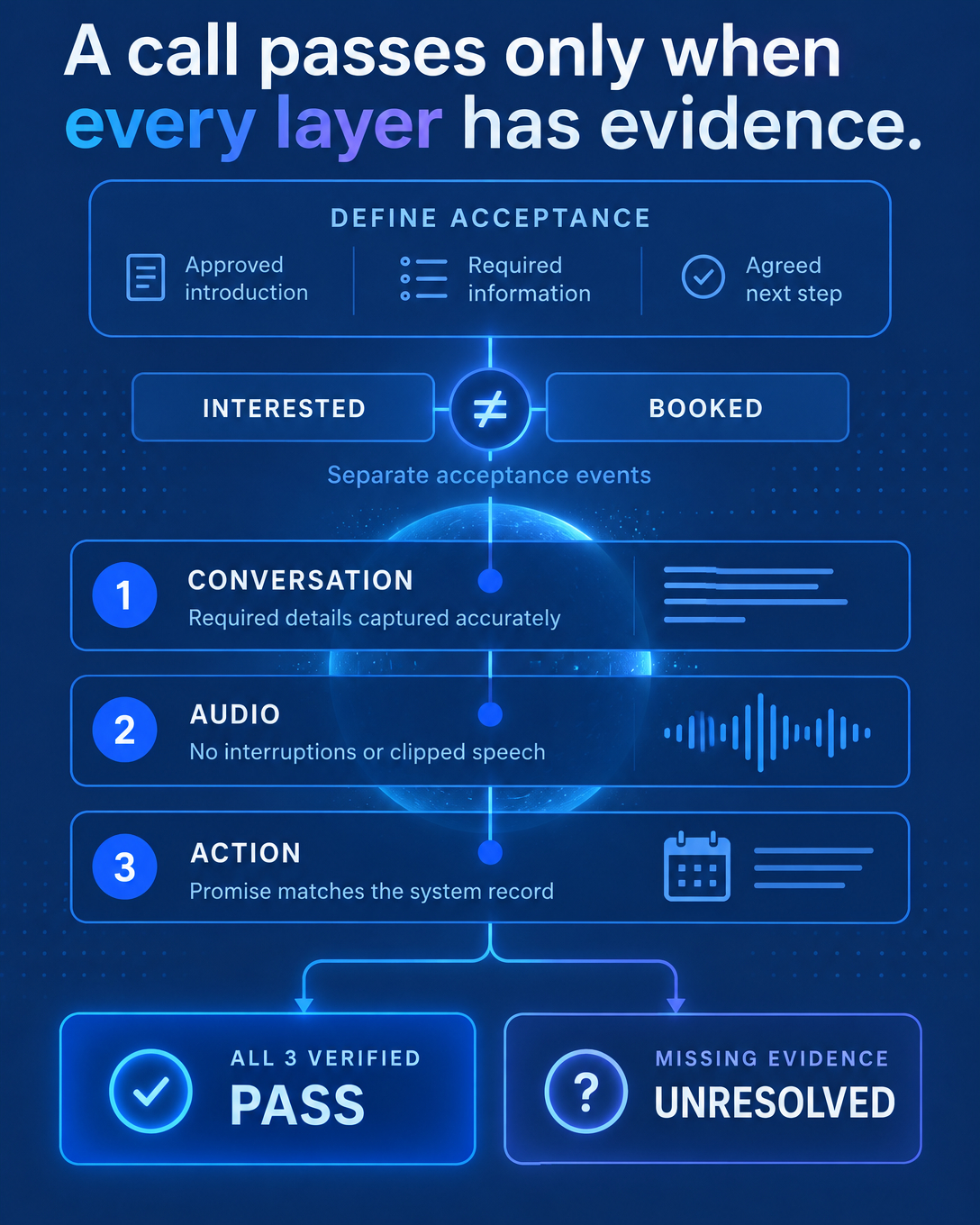
Source evidence. A reviewer can trace the outcome to a recording, transcript or summary where capture is enabled. When capture is off, the record says so.
Agreed next action. The specific step the contact agreed to is written down, along with any configured booking.
Owner and date. Every next action has one named owner and a due date.
Sync visibility. The team can see whether each outcome reached the CRM, which fields were written and when.
Exception handling. Failed or skipped writes appear as unresolved items with a reason and an owner, so a missed sync never looks like a successful one.
Before signing, confirm the dependencies in writing: which CRM connections are supported, which fields can be mapped, what write permissions the integration needs and which capabilities the plan includes.
FAQ
Should a team still replace its CRM? Sometimes. If the platform cannot hold the fields, permissions or connections the workflow needs, replacement may be justified. Trace several recent calls into their records first so the decision rests on evidence.
Does every call write a complete CRM record automatically? No. What reaches the CRM depends on configured connections, field mapping, write permissions, plan and capture availability. Human-call transcription and summaries need recording enabled and provider capture configured. Anything that did not sync should show as unresolved.
Does this approach require an AI caller? No. The checklist applies to AI and human calls alike. When an AI caller is on the line, the person on the other end should know the call is automated.
A Practical First Step
Pick ten recent calls and compare what was said with what was saved. Score each record against the checklist above. The results show whether the team needs new software or a connected path into the CRM it already owns.
To see how stored call history, configured booking, CRM export of finalized outcomes and unresolved sync states look on a real setup, book a walkthrough at ai-vantara.com.
Sources
Public discussion, r/CRMSoftware: AI in CRM: is AI really useful in a CRM?
Public discussion, r/CRMSoftware: Which CRM AI features do you actually use day to day?
Product: Vantara