Define the job
Set the caller identity, purpose, opening guidance, CTA or action, capture fields, and the campaign or channel the configuration applies to.
How Vantara works
Vantara resolves the purpose and allowed actions for each call, runs the appropriate voice workflow, and preserves the resulting operational truth for follow-up. The product evidence below uses real Vantara workspace screens with sensitive identifiers redacted.
Product mechanics
Vantara separates discovery, policy, live calling, and post-call review instead of hiding the entire workflow inside one prompt.
Set the caller identity, purpose, opening guidance, CTA or action, capture fields, and the campaign or channel the configuration applies to.
Import existing contacts, review staged Lead Finder candidates, or receive an inbound call through a configured workspace number. Provider-backed discovery remains dependent on configured services and source availability.
The selected Call Application and workspace entitlements determine what the voice agent may do. Provider-backed actions such as calendar booking or transfer only run when the required connection and policy are available.
Call outcomes, follow-up state, booking results, and other configured outputs are written to durable workspace data so operators can review what happened after the call.
Real product evidence
Important product information is repeated in crawlable text below; the screenshots are supporting evidence rather than the only explanation.
Evidence note: these are sanitized screens from a configured Vantara workspace. Personal identifiers and account-sensitive values were removed. They demonstrate product surfaces and controls, not customer performance claims.
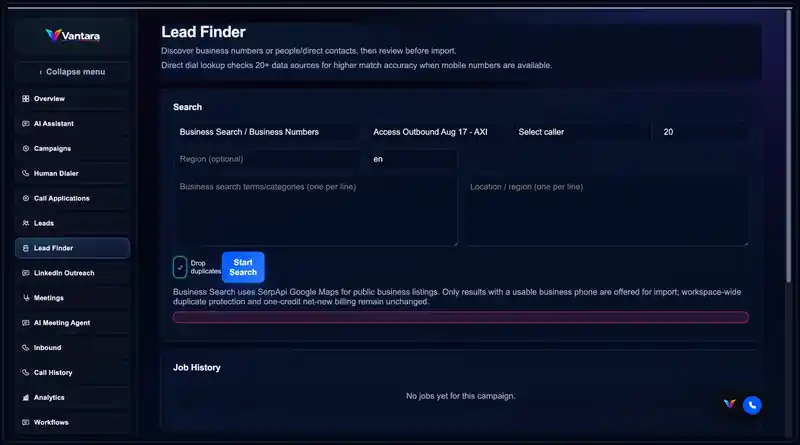
Lead Finder can search configured sources for business numbers or direct-contact candidates and stage results for review before import. Duplicate protection and provider availability still apply; Vantara does not guarantee that every searched business or person will return usable contact data.
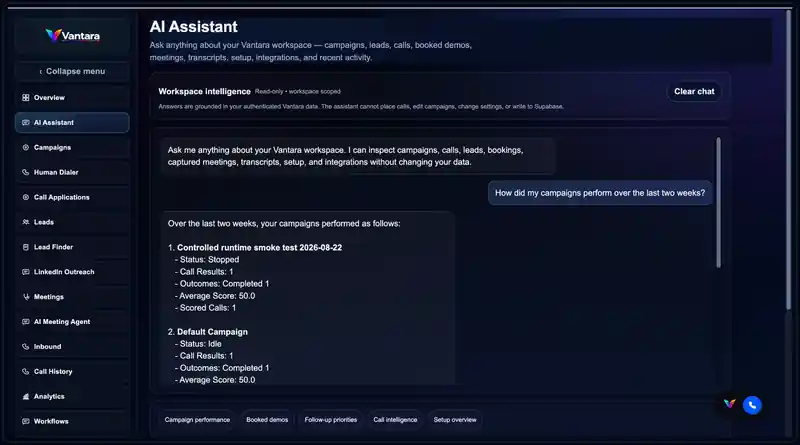
The AI Assistant can inspect authenticated workspace data such as campaigns, leads, calls, bookings, transcripts, setup and integrations. Its customer-facing workspace intelligence mode is read-only and does not place calls, edit campaigns, change settings, or write to Supabase.
Product paths
Vantara separates general product availability from workspace-gated execution and supporting capabilities that are not exposed as activatable dedicated applications.
Vantara Sales is available for outbound qualification, structured capture, follow-up, CTA execution and booking. Vantara General Outbound is also generally available for configured non-sales outbound purposes such as reminders, confirmations, surveys, notifications and structured information capture.
Vantara Front Desk is a production inbound-only application for reception, caller screening, routing, message capture, configured booking/actions, and after-hours handling. It can be purchased through standalone inbound plans or used through eligible bundled entitlements.
Calendar-connected booking, confirmation, rescheduling, cancellation, and reminder capabilities are kept separate from Sales behavior. Automated Scheduler calling requires workspace activation, a usable connected calendar, and the configured execution path.
Vantara includes supporting service-triage, approved-knowledge, case-intake, post-call summary, quality, and commitment-signal capabilities through existing workflow and review surfaces. Dedicated Service Desk and Call Intelligence Call Application activation is not currently exposed.
Controls and boundaries
Vantara is designed to keep purpose, permissions, cost-bearing actions and post-call outcomes explicit.
Sales, non-sales outbound, inbound handling, scheduling, service, and intelligence workflows keep separate objectives and allowed actions instead of sharing one unrestricted prompt.
Available times are checked through the configured calendar path before a booking is confirmed. Vantara does not fabricate availability when a usable calendar connection is missing.
Warm transfer or live handoff only applies where the workspace, call direction, destination policy and provider path support it.
Recordings, transcripts, summaries and structured outputs depend on the enabled workflow and capture settings. Missing data should remain missing rather than being invented.
Provider-backed calling and tool actions are subject to plan entitlements, hard caps and availability. Additional usage is not silently converted into automatic overage billing.
Vantara automates configured calling workflows and records their outcomes. It does not guarantee answer rates, booked meetings, revenue, contact-data completeness or a particular commercial result.
Explore by capability
Platform FAQ
No. Vantara Sales and Vantara General Outbound cover distinct outbound purposes, while Vantara Front Desk provides production inbound handling. Automated Scheduler calling requires workspace activation and the configured execution path. Supporting service-triage and post-call intelligence capabilities exist, while dedicated Service Desk and Call Intelligence application activation is not currently exposed.
No. Lead Finder stages candidates for review before import. Usable results depend on the configured provider, source availability, duplicate checks and the presence of callable contact data.
Enabled booking workflows can check a connected calendar, offer available times and create a booking after the required confirmation. Booking depends on a usable workspace calendar connection and the relevant workflow entitlement; Vantara does not invent available times.
Yes. Persisted call outcomes and follow-up state are available through Call History. Recordings, transcripts, summaries and structured outputs are shown only where those capture paths are enabled.
No. The workspace AI Assistant shown here is read-only. It can inspect authenticated workspace data but does not place calls, edit campaigns, change settings or write to Supabase.
See the workflow with your use case