
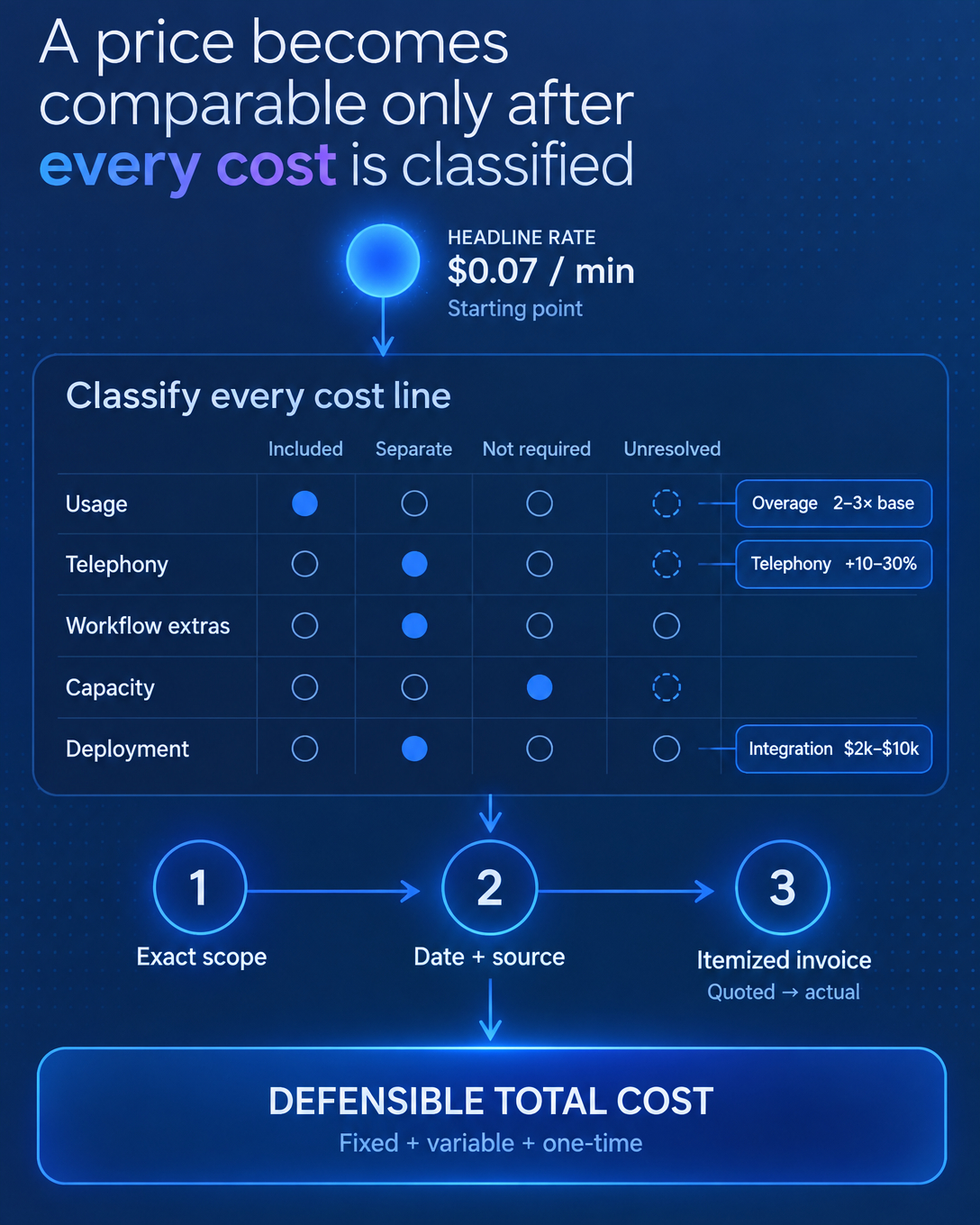
Published pricing for AI voice platforms is a starting point. The headline rate tells you what the vendor wants to anchor the conversation on. It rarely tells you what your campaign will cost once telephony, transfers, voicemail handling, and overage rules enter the invoice.
You can close that distance with a structured request-for-quote process. This guide walks you through it step by step.
Step 1: Understand what the headline rate leaves out
Every AI voice minute stacks several billed components: speech-to-text, model inference, text-to-speech, and telephony. A platform advertising $0.07 per minute can land closer to $0.11 to $0.14 on a typical conversation once those layers run together.
Telephony deserves specific attention. Many platforms list it as "billed separately," and it adds 10 to 30 percent to the total. One buyer running 10,000 minutes on a $0.10 per minute platform expected a $1,000 bill and received $1,150 after telephony fees.
Overage rules matter just as much. Exceeding included minutes can trigger rates 2 to 3 times the base price, and several vendors publish no overage rate at all.
If a cost behavior is undocumented, treat it as unresolved until the vendor puts it in writing.
Step 2: Define the calling job before you ask for a price
A quote only means something when it describes a specific configuration. Write down the audience, the approved purpose of the call, the next step the agent should produce, and the evidence your team needs to accept the result.
Then request pricing for that exact setup. A quote for an inbound receptionist workload tells you nothing about an outbound sales campaign. Scope first, price second.
Step 3: Build the request-for-quote template
Send every vendor the same line items and require a status for each one. Use exactly four statuses:
- Included: confirmed in the quote or current tariff, in writing.
- Separately billed: a real cost with a documented rate.
- Not required: your configuration never triggers it.
- Unresolved: nobody has confirmed it yet. Leave the amount blank.
Run these budget lines through that four-status check:
- Platform or subscription fees, including minimum commitments
- Voice and telephony, including rounding rules and number costs
- Transfers, voicemail handling, and premium voices
- Lead and contact data, including replacement of unusable records
- Implementation and integration work
- Ongoing call review and exception handling
- Overage rates and what happens when the allowance runs out
- Concurrency limits and the cost of additional capacity
This template adds no charges to any vendor's tariff. It forces every cost into the open so your sales, operations, and finance teams work from one budget.
💡 Tip: integration work is commonly overlooked in per-minute comparisons. Custom API work can run $2,000 to $10,000, and it is often the largest one-time expense in the deployment.
Step 4: Record the configuration date on every quote
Pricing pages change. Plans get restructured. A vendor's older blog post can show a different headline rate than its current billing documentation, which tells you to ask which plan and deployment your quote covers.
Stamp every quote with three things:
- The date you captured it
- The exact plan and configuration it covers
- The source, whether a signed quote or a dated screenshot of the tariff page
A price without a date and a configuration is an anecdote. A price with both is a budget input you can defend to finance.
Recheck the official pricing page before you sign, and again at renewal. The quote from six months ago describes a tariff that existed six months ago.
Step 5: Reconcile the quote against an itemized invoice
The quote is a prediction. The invoice is the truth. Run a small pilot, then ask the vendor to reconcile your recorded call events against an itemized bill.
Check three things: billable duration versus connected duration, any chargeable voicemail or transfer time, and whether overage rules behaved as documented. Every discrepancy goes back into your template as a new line with an owner.
⚠️ Warning: a budget that only divides the subscription by the included minutes misses the point. Allocate fixed fees over actual usage and keep the variable tariff in its own column, so capacity cost stays separate from marginal cost.
What this process gives you
Execution you cannot trace becomes theater, and that applies to spend as much as to calls. When every cost line carries a status, a date, and a source, you compare vendors on real economics instead of headline rates.
Build the template, define the job, date the quote, reconcile the invoice. Then make the buying decision with numbers you can inspect.